- YEAR
- 2023
- ROLE
- Design Lead
- STATUS
- In progress
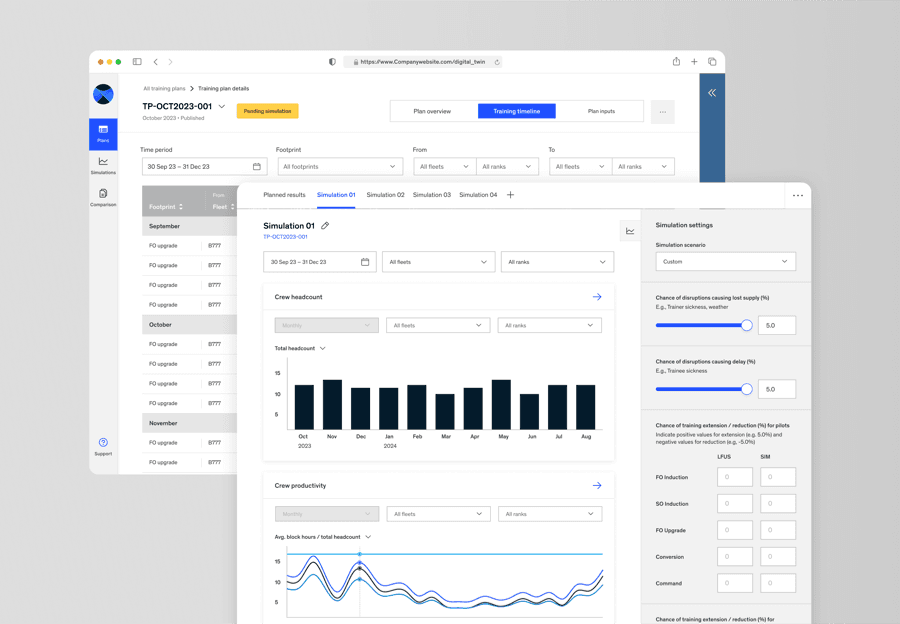
Simulating the training pipeline before committing to it
Despite the post COVID-19 travel boom, our client was facing significant difficulties ramping up resources to meet the surge in travel demand. Untapped business opportunities were lost to competitors who could capture the market share the client couldn't serve in time.
To address this, a Digital Twin was developed to generate comprehensive pilot training plans, with the capability to simulate those plans through a detailed probabilistic model. By evaluating potential scenarios, the client could anticipate resource bottlenecks earlier and ensure enough pilots were trained and available precisely when needed.
- planned trainings starting on time
- 80%
- planned trainings starting on time
- in implementing a digital twin in the pilot training space
- First mover
- in implementing a digital twin in the pilot training space
- from design to MVP launch
- 4 months
- from design to MVP launch
Manual Excel plans, with half of trainings never executed
Existing pilot training plans were produced manually every month, based on static assumptions without clear insight into feasibility. Inaccurate estimates led to shortages or surpluses of pilots — with over 50% of planned trainings going unexecuted.
The client needed a solution beyond manual Excel-based methods to inform strategic decisions and ensure optimal pilot availability while minimising costs: both short-term fixes and a systematic, long-term approach. Introducing a Digital Twin aimed to simulate scenarios and project outcomes for those longer-term needs. As the designer, I was tasked with initiating the development of the MVP.
HOW MIGHT WE
Create, explore, simulate and compare training plans
- 01
Generate a training plan
Select a method for generating a plan — from existing inputs of a training plan, new inputs, or an existing file. Input key parameters, upload the necessary files, and a training plan is generated for the month.
- 02
Explore your training plan
A clear, organised view of training plan details lets planners review every aspect, from pilot assignments to training sessions, ensuring transparency and effective management.
- 03
Simulate training outcomes
The simulation tool projects and analyses the potential performance of a training plan, helping planners anticipate challenges and optimise pilot availability before implementation.
- 04
Compare simulation results
Comparative analysis lets planners evaluate and contrast different training plans and simulation parameters, providing the insight needed to make strategic adjustments.
PRODUCT IMAGERY
Designing for the long term amidst ambiguity
Rapid MVP development and strategic prototyping, in three phases. Each step below opens into the full story.
From manual guesswork to simulated confidence
FROMExcel-based manual data entry
TOAutomatic plan generation
The planning team previously used Excel tables to manually generate training plans — time-consuming and error-prone. The new system generates comprehensive training plans from key parameters and predefined conditions, streamlining the process and reducing errors.
FROMManual past data analysis
TOAutomatic results projection
Analysing past training plan performance previously relied on manual data analysis that lacked forward-looking insights. Automating performance results and projecting trends against scenario-based constraints gives teams actionable insight to evaluate plans with confidence.
FROMFragmented manual work processes
TOStreamlined collaboration
Centralising planning and analysis in one platform, with real-time updates and shared access to data, keeps everyone working from the same page.
FROMInconsistent, error-prone data
TOReliable automated data checks
Automated data checks and processing maintain data integrity by mitigating human error, so the team can trust the accuracy of the data behind their decisions.
Opportunities to enhance outcomes through more structured groundwork
- 01
Aligning technical feasibility with project scope
The team faced challenges enhancing Digital Twin capabilities to fully automate actions and optimise simulations, because the absence of required data and data pipelines only surfaced during testing later in the project. We implemented workarounds to achieve partial functionality, reserving advanced features for future releases.
- 02
Bringing a service design lens to scoping
Initial research and scoping were limited and vague, gathered by a time-tied, multi-tasking business scoping team. The project would have been more impactful with a thorough assessment of the pre- and post-journey through a service design lens: how the tool would actually be used, and its effects on other departments.
- 03
The need for a dedicated product owner
With no product owner on the project, I stepped in to bridge the gap, since I was most involved in day-to-day requirement gathering. I acquired subject matter expertise, planned the roadmap and ran check-ins and follow-ups — but splitting attention meant requirements, prioritisation and usability testing all got less time than they deserved.